Manual Test Runs
Quickly view the status of your tests - see at a glance which ones have passed, which have failed, and which are still pending. Developers can conveniently set a test's status to "retest", enabling your testing team to immediately identify any tests that need to be reattempted, ensuring their successful completion.
Try It Free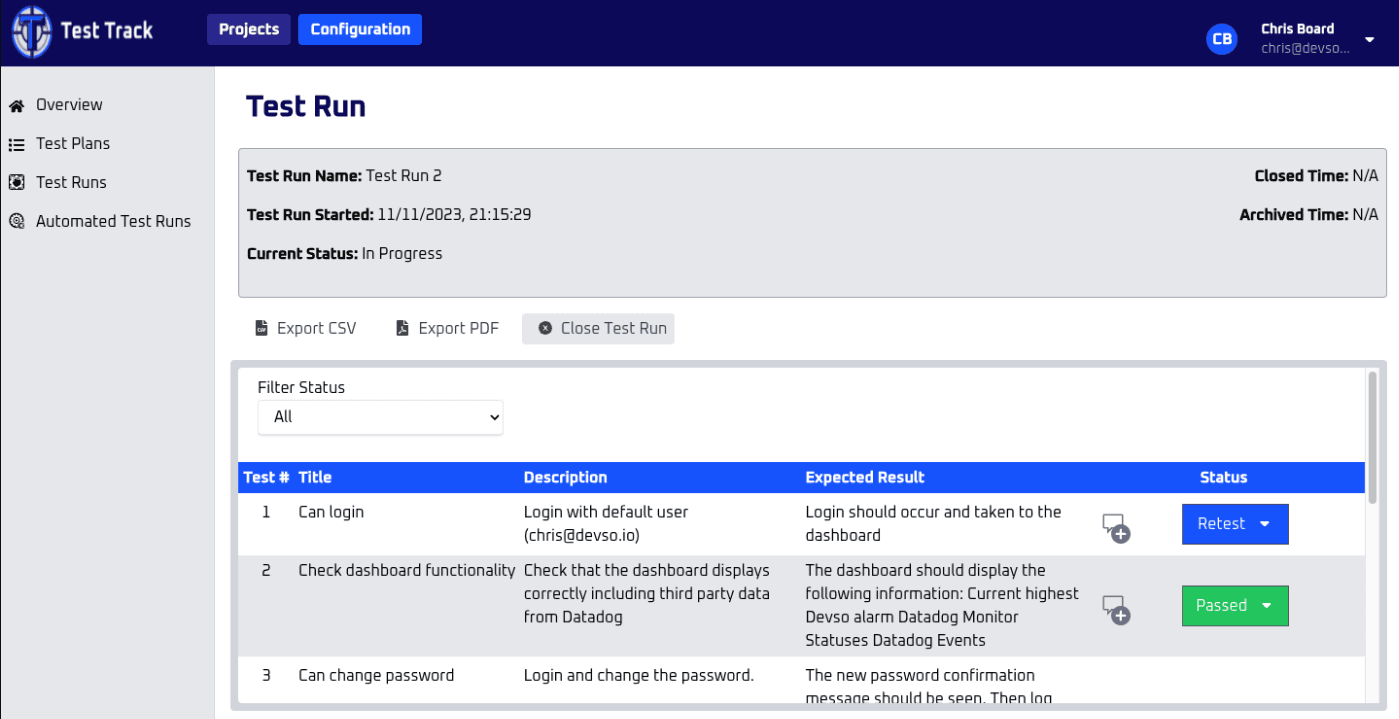
How teams use manual test runs
Teams use manual test runs in Test Track to keep test planning, execution, results, and follow-up work connected in one test management workflow, whether testing is handled by a solo developer, a small business, or a dedicated QA team. This helps teams move away from fragmented spreadsheets and maintain clearer testing evidence for releases.
Key Benefits
Status Visibility
See passed, failed, and pending tests at a glance.
Retest Workflow
Mark tests for retest to ensure thorough coverage.
Team Collaboration
Testers can pick up where others left off seamlessly.
Frequently asked questions
Who is manual test runs for?
Manual Test Runs is useful for solo developers, indie hackers, SMEs, software teams, and QA teams that need a clearer way to plan, run, and review software tests without relying on spreadsheets.
Does manual test runs work for teams without dedicated QA?
Yes. Test Track is designed for people who need practical test management whether testing is handled by developers, product owners, founders, or a dedicated QA team.
Can manual test runs support release evidence?
Yes. Test Track keeps test activity, results, reports, and supporting evidence connected so teams can review what was tested before a release.
Ready to Get Started?
Experience manual test runs and all our other features with a free 14-day trial.